Nested virtualization
Nested virtualization lets a virtual machine (called L1 below, the guest that hosts the machines inside it) run virtual machines itself: KVM inside a Linux guest, Hyper-V and WSL2 inside Windows. keelOS leaves it off by default; it is turned on separately for each virtual machine. This chapter covers what you can and cannot do once it is on, and what limits it brings.
1. What works
These have actually been tested on keelOS:
- KVM inside a Linux guest: install
qemu-system-x86in Debian and start virtual machines (L2) inside it; starting and stopping repeatedly many times works fine. - Hyper-V inside Windows 10: after installing Hyper-V and restarting, the hypervisor starts normally, and you can create a generation 2 virtual machine inside and boot Linux in it.
- WSL2 inside Windows 10: import a distribution with
wsl --import … --version 2; starting and stopping it 10 times in a row succeeded.
Not tested item by item, but depending on the same KVM or Hyper-V abilities in principle: KVM-based microVMs such as Firecracker (inside a Linux guest), and Docker Desktop (which relies on WSL2 or Hyper-V). If you run into problems, please tell us what you see.
2. What is not supported yet
- AMD hosts: only Intel hosts running on hyp can use it. On an AMD host the switch is greyed out, with the reason next to it.
- Windows VBS and memory integrity (HVCI): Windows can bring up Hyper-V inside a guest with nesting turned on; HVCI cannot be used yet (it needs more CPU and IOMMU features). Windows 11 and Windows Server have not been tested.
- Live migration, and moving between storage pools while running: not possible for now for a machine with nesting on (suspend and reload work, see §3; cold migration has not been specifically tested).
- PCI passthrough: cannot be used together with nesting. For a virtual machine with passthrough devices the switch is greyed out; for a virtual machine with nesting on, the button to add PCI devices is greyed out.
- keelOS's Hyper-V enlightenments: Windows templates normally give the guest a set of Hyper-V enlightenments to improve performance. A Windows guest with nesting on runs its own Hyper-V, so this set is not given by default; writing
"hyperv": trueby hand is rejected. - kcell: nesting cannot be turned on.
3. Suspend, reload and upgrades
The host saves the CPU state of a virtual machine with nesting on (including "which virtual machine inside it is running") into the checkpoint:
- Suspend and resume are the same as for other virtual machines. After resuming, KVM, Hyper-V and WSL2 inside L1 and the virtual machines running inside them carry on without restarting.
- At a host reload it is suspended and resumed after the reload, like other virtual machines. In the list its reload action reads "suspended for a root reload".
- Exception: while a new version is still on trial (after an upgrade and before you click Confirm the upgrade; see the upgrade chapter). During that time the host writes checkpoints in the old version's format, which cannot hold this state. So: it cannot be suspended; while it runs, a host reload, restart or slot switch is refused, and the page (System → Upgrade, System → Maintenance) lists this virtual machine with a Stop … button beside it; in the list the reload action reads "shut down for a root reload (nested virtualization)", and
keel vm listshowspoweroff (nested). After you confirm the upgrade these limits go away. - Switching to an old-version slot that cannot read this kind of checkpoint is refused (shut it down first).
4. How to turn it on
In the web page:
- Under Virtual machines click the virtual machine to change, then Edit (when creating, on the last step of the wizard, or in the Devices section of "Custom").
- In the Devices section tick Nested virtualization (run hypervisors inside this VM); a line of small text below it gives the limits above.
- Save. The setting takes effect the next time the virtual machine cold starts: a running machine must be shut down and started again.
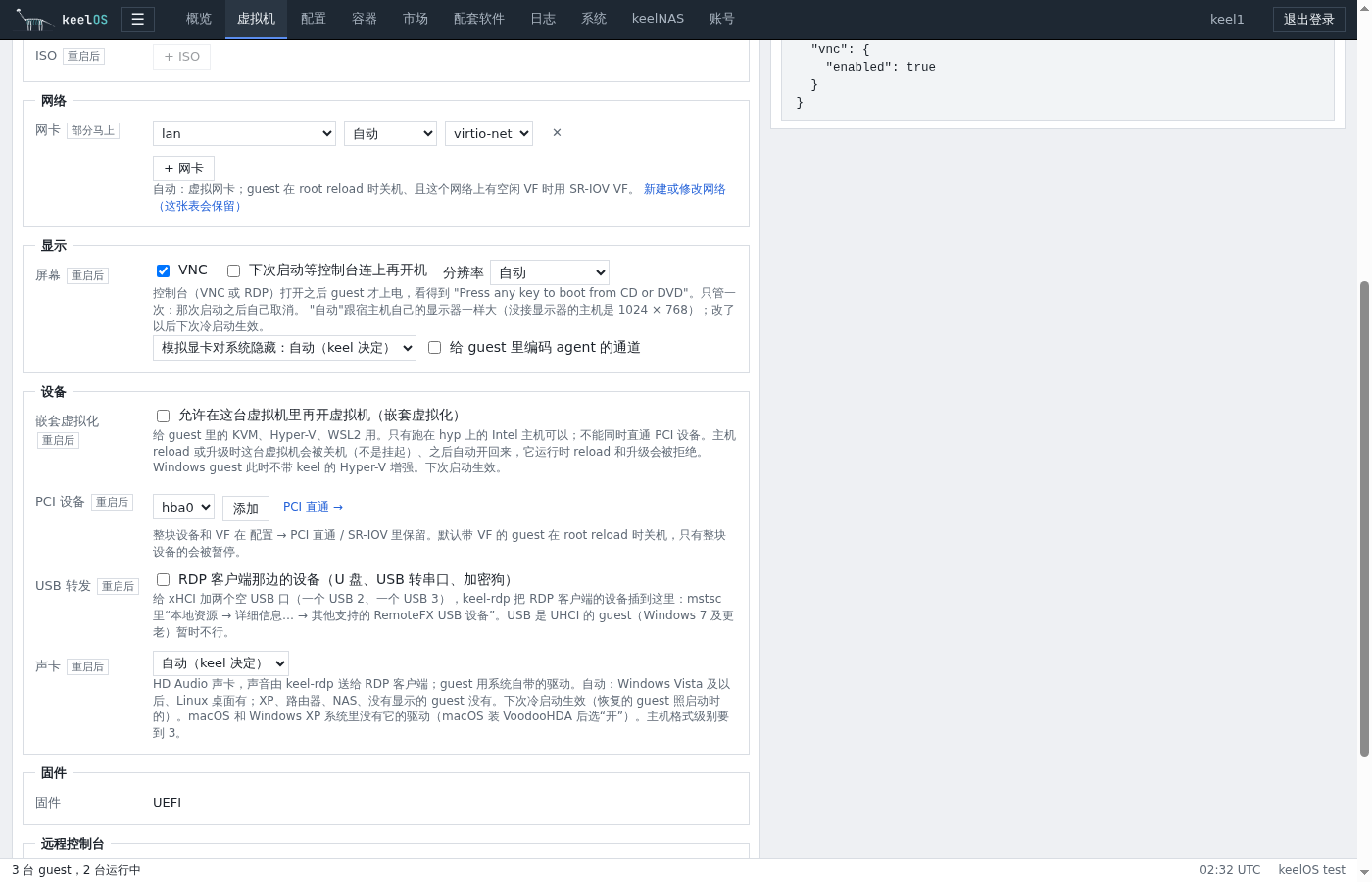
If the switch is greyed out, the reason is written next to it: the host is not running on keelOS's hyp, the host has an AMD CPU, the host's hypervisor module is too old (upgrade keelOS), or this virtual machine has PCI passthrough devices.
On the command line: add --nested when creating, or for an existing machine write "nested": true in config.json:
keel vm create --alias lab --vcpus 4 --ram 8G --disk 60G --nested
The RELOAD column of keel vm list shows suspend for such a machine (poweroff (nested) during a trial, see §3).
5. Using it
- Give L1 enough CPU and memory: the virtual machines inside come out of L1's memory. Once Hyper-V is installed, Windows itself becomes Hyper-V's "root partition".
- Windows: after installing Hyper-V, restart once; after the restart
systeminfosays "A hypervisor has been detected", which is normal. - Performance: every exit of an L2 (a virtual machine inside) goes back and forth between root and hyp about 16 times, measured in the tens of microseconds (about 32 microseconds each on the test machine). Workloads with many page faults (compiling, fork-heavy) get much faster thanks to nested EPT (on the test machine, fork-heavy workloads were 22 times faster and page-fault-heavy ones 44 times faster than without nested EPT); workloads with many exits (lots of I/O and interrupts) pay this cost on every exit and will be slower than running directly in L1. It is suitable for experiments, development and test environments, but do not use it as the base of production virtualization.
6. Troubleshooting
- Saving says
nested virtualization and passthrough devices cannot be combined: remove the PCI devices first, or turn nesting off. - Saving says
… the Hyper-V enlightenments cannot be combined yet: config.json has"hyperv": true; delete it. - A host reload or upgrade is refused with
runs with nested virtualization … shut it down first: the new version is still on trial (or the host's vmm module is too old); shut down the virtual machines listed, or confirm the upgrade first. - After
kvm_intelloads in L1 there is noept=Y: make sure the host's vmm module is new (see the version under System → Upgrade).
Details and test records are in the design document docs/69.